Quick Start BlackHole
Tài liệu hướng dẫn triển khai BlackHole bao gồm đầy đủ các thành phần: Core, Search, Device Management.
Tài liệu hướng dẫn cho bản cài Tarball.
1. Yêu cầu tối thiểu
Yêu cầu mỗi VM tối thiểu 2GB RAM, 50 GB Disk.
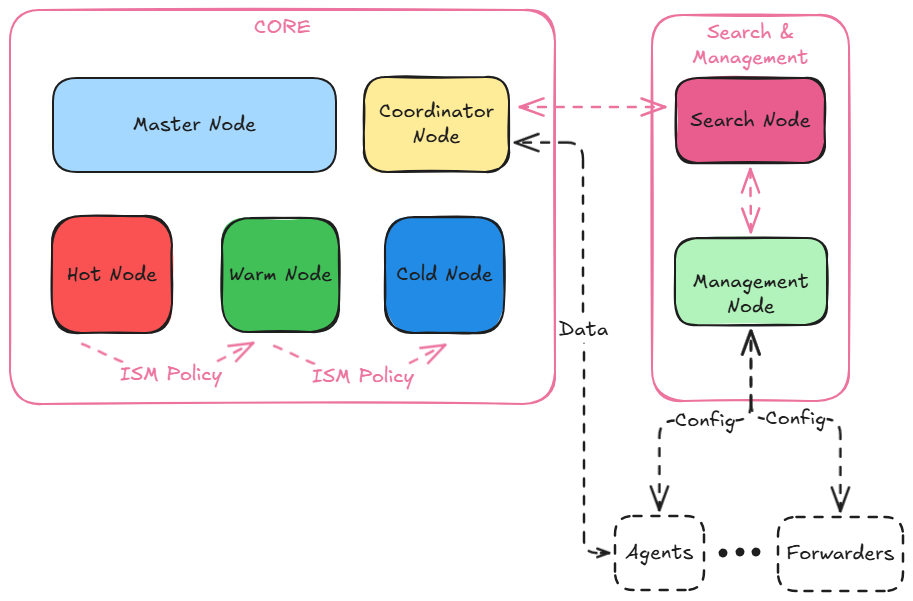
| Node | Chức năng |
|---|---|
| Master Node | Quản lý hoạt động tổng thể của một cụm và theo dõi trạng thái của cụm. Điều này bao gồm việc tạo và xóa các index, theo dõi các node tham gia và rời khỏi cụm, kiểm tra tình trạng hoạt động của từng nút trong cụm (bằng cách thực hiện các yêu cầu ping) và phân bổ các phân vùng cho các node. |
| Coordinator Node | Chuyển tiếp yêu cầu của Client đến các phân vùng trên các data node, thu thập và tổng hợp kết quả thành một kết quả cuối cùng, sau đó gửi kết quả này trở lại cho Client. |
| Hot Node (Data Node) | Lưu trữ và tìm kiếm dữ liệu. Thực hiện tất cả các thao tác liên quan đến dữ liệu (lập index, tìm kiếm, tích hợp) trên các local shard. Đây là các node làm việc của cụm và cần nhiều không gian đĩa hơn so với bất kỳ loại nút nào khác. |
| Warm Node (Data Node) | Lưu trữ và tìm kiếm dữ liệu. Thực hiện tất cả các thao tác liên quan đến dữ liệu (lập index, tìm kiếm, tích hợp) trên các local shard. Đây là các node làm việc của cụm và cần nhiều không gian đĩa hơn so với bất kỳ loại nút nào khác. |
| Cold Node (Data Node) | Lưu trữ và tìm kiếm dữ liệu. Thực hiện tất cả các thao tác liên quan đến dữ liệu (lập index, tìm kiếm, tích hợp) trên các local shard. Đây là các node làm việc của cụm và cần nhiều không gian đĩa hơn so với bất kỳ loại nút nào khác. |
| Search Node | Thực hiện việc tìm kiếm, phân tích, tương quan dữ liệu. Được sử dụng để giám sát, tạo luật và dashboard trực quan |
| Management Node | Quản lý license và các cấu hình của agent hoặc forwarder. Nếu license hết hạn hoặc không tồn tại sẽ không thực hiện được việc ghi dữ liệu vào data node. |
Danh sách các port bao gồm:
| Port | Thành phần |
|---|---|
| 9200 | BlackHole REST API |
| 9300 | Giao tiếp giữa các node (internal), cross cluster search |
| 9600 | Performance Analyzer |
| 5601 | Dashboard UI |
| 3000 | Device Management |
2. Cài đặt BlackHole Core (Ubuntu 24.04)
Giả định IP các node như bảng
| Node | IP |
|---|---|
| Master Node | 172.16.0.1 |
| Coordinator Node | 172.16.0.2 |
| Hot Node | 172.16.0.3 |
| Warm Node | 172.16.0.4 |
| Cold Node | 172.16.0.5 |
| Search Node | 172.16.0.6 |
| Management Node | 172.16.0.7 |
Bước 1: Tải và giải nén BlackHole Core
- Sử dụng câu lệnh sau để tải xuống file cài đặt:
sudo wget https://docs-blackhole.glabs.one/downloads/blackhole-core/blackhole-core-linux.tar.gz -o /opt/blackhole.tar.gz- Giải nén:
sudo cd /opt
sudo tar -xvf blackhole.tar.gz
sudo mv blackhole-3.1.0 blackhole
Bước 2: Cấu hình thiết lập hệ thống
Trên tất cả các VM thực hiện:
- Tắt swap để cải thiện hiệu suất:
sudo swapoff -a
sudo sed -i '/ swap / s/^/#/' /etc/fstab- Tăng số lượng memory maps cho BlackHole:
sudo echo "vm.max_map_count=262144" >> /etc/sysctl.confReload và xác minh:
# Reload cấu hình
sudo sysctl -p

# Xác minh thay đổi
cat /proc/sys/vm/max_map_count- Cấu hình JVM heap (nên set RAM bằng 1/2 RAM của VM):
sed -i 's/^-Xms1g/-Xms2g/' /opt/blackhole/config/jvm.options
sed -i 's/^-Xmx1g/-Xmx2g/' /opt/blackhole/config/jvm.options
Bước 3: Gen Cert cho từng node
- Script sau sẽ sinh cert cho 5 node (thực hiện trên 1 node duy nhất)
#!/bin/bash
set -e

BASE_DIR="$(pwd)/certs"
DAYS=3650

NODES=(
  "blackhole-master"
  "blackhole-coordinator"
  "blackhole-hot"
  "blackhole-warm"
  "blackhole-cold"
)

mkdir -p ${BASE_DIR}/{ca,admin,nodes}

echo "[1/6] Create Root CA..."
openssl genrsa -out ${BASE_DIR}/ca/root-ca-key.pem 4096
openssl req -x509 -new -nodes \
  -key ${BASE_DIR}/ca/root-ca-key.pem \
  -sha256 -days ${DAYS} \
  -out ${BASE_DIR}/ca/root-ca.pem \
  -subj "/C=VN/O=BlackHole/OU=PKI/CN=BlackHole-Root-CA"

echo "[2/6] Create Admin certificate..."
openssl genrsa -out ${BASE_DIR}/admin/admin-key.pem 4096
openssl req -new \
  -key ${BASE_DIR}/admin/admin-key.pem \
  -out ${BASE_DIR}/admin/admin.csr \
  -subj "/C=VN/O=BlackHole/OU=Security/CN=admin"

openssl x509 -req \
  -in ${BASE_DIR}/admin/admin.csr \
  -CA ${BASE_DIR}/ca/root-ca.pem \
  -CAkey ${BASE_DIR}/ca/root-ca-key.pem \
  -CAcreateserial \
  -out ${BASE_DIR}/admin/admin.pem \
  -days ${DAYS} -sha256

rm -f ${BASE_DIR}/admin/admin.csr

echo "[3/6] Create Node certificates (DNS-only SAN)..."
for NODE in "${NODES[@]}"; do
  echo "  → ${NODE}"

  cat > ${BASE_DIR}/nodes/${NODE}-ext.cnf <<EOF
subjectAltName = @alt_names
extendedKeyUsage = serverAuth, clientAuth

[alt_names]
DNS.1 = ${NODE}
DNS.2 = ${NODE}.blackhole.local
EOF

  openssl genrsa -out ${BASE_DIR}/nodes/${NODE}-key.pem 4096

  openssl req -new \
    -key ${BASE_DIR}/nodes/${NODE}-key.pem \
    -out ${BASE_DIR}/nodes/${NODE}.csr \
    -subj "/C=VN/O=BlackHole/OU=Infrastructure/CN=${NODE}"

  openssl x509 -req \
    -in ${BASE_DIR}/nodes/${NODE}.csr \
    -CA ${BASE_DIR}/ca/root-ca.pem \
    -CAkey ${BASE_DIR}/ca/root-ca-key.pem \
    -CAcreateserial \
    -out ${BASE_DIR}/nodes/${NODE}.pem \
    -days ${DAYS} -sha256 \
    -extfile ${BASE_DIR}/nodes/${NODE}-ext.cnf

  rm -f ${BASE_DIR}/nodes/${NODE}.csr ${BASE_DIR}/nodes/${NODE}-ext.cnf
done

echo "[6/6] DONE – Certificates ready at: ${BASE_DIR}"- Script sẽ sinh ra các certs như bên dưới:
ubuntu@p5-testing-blackhole-db-master:~$ ls -la /opt/blackhole/config/certs/
total 20
drwxr-xr-x 5 blackhole blackhole 4096 Jan  8 13:55 .
drwxr-xr-x 5 blackhole blackhole 4096 Jan 16 08:51 ..
drwxr-xr-x 2 blackhole blackhole 4096 Jan  8 13:55 admin
drwxr-xr-x 2 blackhole blackhole 4096 Jan  8 13:55 ca
drwxr-xr-x 2 blackhole blackhole 4096 Jan  8 13:55 nodes
ubuntu@p5-testing-blackhole-db-master:~$ ls -la /opt/blackhole/config/certs/admin/
total 16
drwxr-xr-x 2 blackhole blackhole 4096 Jan  8 13:55 .
drwxr-xr-x 5 blackhole blackhole 4096 Jan 16 08:51 ..
-rw-r--r-- 1 blackhole blackhole 3268 Jan  8 13:55 admin-key.pem
-rw-r--r-- 1 blackhole blackhole 1826 Jan  8 13:55 admin.pem
ubuntu@p5-testing-blackhole-db-master:~$ ls -la /opt/blackhole/config/certs/nodes/
total 56
drwxr-xr-x 2 blackhole blackhole 4096 Jan  8 13:55 .
drwxr-xr-x 5 blackhole blackhole 4096 Jan 16 08:51 ..
-rw-r--r-- 1 blackhole blackhole 3268 Jan  8 13:55 blackhole-cold-key.pem
-rw-r--r-- 1 blackhole blackhole 2069 Jan  8 13:55 blackhole-cold.pem
-rw-r--r-- 1 blackhole blackhole 3272 Jan  8 13:55 blackhole-coordinator-key.pem
-rw-r--r-- 1 blackhole blackhole 2098 Jan  8 13:55 blackhole-coordinator.pem
-rw-r--r-- 1 blackhole blackhole 3272 Jan  8 13:55 blackhole-hot-key.pem
-rw-r--r-- 1 blackhole blackhole 2065 Jan  8 13:55 blackhole-hot.pem
-rw-r--r-- 1 blackhole blackhole 3272 Jan  8 13:55 blackhole-master-key.pem
-rw-r--r-- 1 blackhole blackhole 2078 Jan  8 13:55 blackhole-master.pem
-rw-r--r-- 1 blackhole blackhole 3272 Jan  8 13:55 blackhole-warm-key.pem
-rw-r--r-- 1 blackhole blackhole 2069 Jan  8 13:55 blackhole-warm.pem
-rw------- 1 blackhole blackhole 3272 Jan  8 13:55 dashboard-key.pem
-rw-r--r-- 1 blackhole blackhole 2025 Jan  8 13:55 dashboard.pem
ubuntu@p5-testing-blackhole-db-master:~$ ls -la /opt/blackhole/config/certs/ca/
total 20
drwxr-xr-x 2 blackhole blackhole 4096 Jan  8 13:55 .
drwxr-xr-x 5 blackhole blackhole 4096 Jan 16 08:51 ..
-rw-r--r-- 1 blackhole blackhole 3272 Jan  8 13:55 root-ca-key.pem
-rw-r--r-- 1 blackhole blackhole 1956 Jan  8 13:55 root-ca.pem
-rw-r--r-- 1 blackhole blackhole 41 Jan 8 13:55 root-ca.srl- Di chuyển các certs vào đúng thư mục trong đường dẫn
	sudo mkdir -p /opt/blackhole/config/certs
# Di chuyển các cert root-ca.pem, node-name.pem, node-cert.pem vào thư mục trên với đường dẫn tương ứng- Phân lại quyền để đảm bảo bảo mật
chmod 600 certs/ca/*
chmod 600 certs/admin/*
chmod 600 certs/nodes/*
Bước 4: Cài đặt BlackHole
Khởi tạo các biến môi trường
Cài đặt biến môi trường trỏ tới JDK
bashsudo cat >> /etc/environment <<EOF BLACKHOLE_JAVA_HOME=/opt/blackhole/jdk EOF source /etc/environmentĐặt mật khẩu admin khởi tạo
bashexport BLACKHOLE_INITIAL_ADMIN_PASSWORD=<custom-admin-password>Trên từng node, cấu hình file
blackhole.ymlnhư sauMaster Node:
bashcat >> /opt/blackhole/config/blackhole.yml << EOF cluster.name: blackhole-cluster node.name: blackhole-master node.roles: [ cluster_manager ] discovery.seed_hosts: ["172.16.0.1", "172.16.0.2", "172.16.0.3", "172.16.0.4", "172.16.0.5"] cluster.initial_cluster_manager_nodes: - blackhole-master bootstrap.memory_lock: false network.host: 0.0.0.0 plugins.security.disabled: false plugins.security.ssl.transport.pemcert_filepath: certs/nodes/blackhole-coordinator.pem plugins.security.ssl.transport.pemkey_filepath: certs/nodes/blackhole-coordinator-key.pem plugins.security.ssl.transport.pemtrustedcas_filepath: certs/ca/root-ca.pem plugins.security.ssl.http.enabled: true plugins.security.ssl.http.pemcert_filepath: certs/nodes/blackhole-coordinator.pem plugins.security.ssl.http.pemkey_filepath: certs/nodes/blackhole-coordinator-key.pem plugins.security.ssl.http.pemtrustedcas_filepath: certs/ca/root-ca.pem plugins.security.allow_default_init_securityindex: true plugins.security.authcz.admin_dn: - "CN=admin,OU=Security,O=BlackHole,C=VN" plugins.security.nodes_dn: - "CN=blackhole-master,OU=Infrastructure,O=BlackHole,C=VN" - "CN=blackhole-coordinator,OU=Infrastructure,O=BlackHole,C=VN" - "CN=blackhole-hot,OU=Infrastructure,O=BlackHole,C=VN" - "CN=blackhole-warm,OU=Infrastructure,O=BlackHole,C=VN" - "CN=blackhole-cold,OU=Infrastructure,O=BlackHole,C=VN" - "CN=blackhole-dashboard,OU=Infrastructure,O=BlackHole,C=VN" plugins.security.audit.type: internal_blackhole plugins.security.enable_snapshot_restore_privilege: true plugins.security.check_snapshot_restore_write_privileges: true plugins.security.restapi.roles_enabled: [all_access, security_rest_api_access] plugins.security.system_indices.enabled: true EOFCoordinator Node:
bashcat >> /opt/blackhole/config/blackhole.yml << EOF cluster.name: blackhole-cluster node.name: blackhole-coordinator node.roles: [ ] discovery.seed_hosts: ["172.16.0.1", "172.16.0.2", "172.16.0.3", "172.16.0.4", "172.16.0.5"] cluster.initial_cluster_manager_nodes: - blackhole-master bootstrap.memory_lock: false network.host: 0.0.0.0 plugins.security.disabled: false plugins.security.ssl.transport.pemcert_filepath: certs/nodes/blackhole-coordinator.pem plugins.security.ssl.transport.pemkey_filepath: certs/nodes/blackhole-coordinator-key.pem plugins.security.ssl.transport.pemtrustedcas_filepath: certs/ca/root-ca.pem plugins.security.ssl.http.enabled: true plugins.security.ssl.http.pemcert_filepath: certs/nodes/blackhole-coordinator.pem plugins.security.ssl.http.pemkey_filepath: certs/nodes/blackhole-coordinator-key.pem plugins.security.ssl.http.pemtrustedcas_filepath: certs/ca/root-ca.pem plugins.security.allow_default_init_securityindex: true plugins.security.authcz.admin_dn: - "CN=admin,OU=Security,O=BlackHole,C=VN" plugins.security.nodes_dn: - "CN=blackhole-master,OU=Infrastructure,O=BlackHole,C=VN" - "CN=blackhole-coordinator,OU=Infrastructure,O=BlackHole,C=VN" - "CN=blackhole-hot,OU=Infrastructure,O=BlackHole,C=VN" - "CN=blackhole-warm,OU=Infrastructure,O=BlackHole,C=VN" - "CN=blackhole-cold,OU=Infrastructure,O=BlackHole,C=VN" - "CN=blackhole-dashboard,OU=Infrastructure,O=BlackHole,C=VN" plugins.security.audit.type: internal_blackhole plugins.security.enable_snapshot_restore_privilege: true plugins.security.check_snapshot_restore_write_privileges: true plugins.security.restapi.roles_enabled: [all_access, security_rest_api_access] plugins.security.system_indices.enabled: true EOFHot Node:
bashcat >> /opt/blackhole/config/blackhole.yml << EOF cluster.name: blackhole-cluster node.name: blackhole-hot node.roles: [ data ] discovery.seed_hosts: ["172.16.0.1", "172.16.0.2", "172.16.0.3", "172.16.0.4", "172.16.0.5"] cluster.initial_cluster_manager_nodes: - blackhole-master bootstrap.memory_lock: false network.host: 0.0.0.0 plugins.security.disabled: false plugins.security.ssl.transport.pemcert_filepath: certs/nodes/blackhole-coordinator.pem plugins.security.ssl.transport.pemkey_filepath: certs/nodes/blackhole-coordinator-key.pem plugins.security.ssl.transport.pemtrustedcas_filepath: certs/ca/root-ca.pem plugins.security.ssl.http.enabled: true plugins.security.ssl.http.pemcert_filepath: certs/nodes/blackhole-coordinator.pem plugins.security.ssl.http.pemkey_filepath: certs/nodes/blackhole-coordinator-key.pem plugins.security.ssl.http.pemtrustedcas_filepath: certs/ca/root-ca.pem plugins.security.allow_default_init_securityindex: true plugins.security.authcz.admin_dn: - "CN=admin,OU=Security,O=BlackHole,C=VN" plugins.security.nodes_dn: - "CN=blackhole-master,OU=Infrastructure,O=BlackHole,C=VN" - "CN=blackhole-coordinator,OU=Infrastructure,O=BlackHole,C=VN" - "CN=blackhole-hot,OU=Infrastructure,O=BlackHole,C=VN" - "CN=blackhole-warm,OU=Infrastructure,O=BlackHole,C=VN" - "CN=blackhole-cold,OU=Infrastructure,O=BlackHole,C=VN" - "CN=blackhole-dashboard,OU=Infrastructure,O=BlackHole,C=VN" plugins.security.audit.type: internal_blackhole plugins.security.enable_snapshot_restore_privilege: true plugins.security.check_snapshot_restore_write_privileges: true plugins.security.restapi.roles_enabled: [all_access, security_rest_api_access] plugins.security.system_indices.enabled: true EOFWarm Node:
bashcat >> /opt/blackhole/config/blackhole.yml << EOF cluster.name: blackhole-cluster node.name: blackhole-warm node.roles: [ data ] discovery.seed_hosts: ["172.16.0.1", "172.16.0.2", "172.16.0.3", "172.16.0.4", "172.16.0.5"] cluster.initial_cluster_manager_nodes: - blackhole-master bootstrap.memory_lock: false network.host: 0.0.0.0 plugins.security.disabled: false plugins.security.ssl.transport.pemcert_filepath: certs/nodes/blackhole-coordinator.pem plugins.security.ssl.transport.pemkey_filepath: certs/nodes/blackhole-coordinator-key.pem plugins.security.ssl.transport.pemtrustedcas_filepath: certs/ca/root-ca.pem plugins.security.ssl.http.enabled: true plugins.security.ssl.http.pemcert_filepath: certs/nodes/blackhole-coordinator.pem plugins.security.ssl.http.pemkey_filepath: certs/nodes/blackhole-coordinator-key.pem plugins.security.ssl.http.pemtrustedcas_filepath: certs/ca/root-ca.pem plugins.security.allow_default_init_securityindex: true plugins.security.authcz.admin_dn: - "CN=admin,OU=Security,O=BlackHole,C=VN" plugins.security.nodes_dn: - "CN=blackhole-master,OU=Infrastructure,O=BlackHole,C=VN" - "CN=blackhole-coordinator,OU=Infrastructure,O=BlackHole,C=VN" - "CN=blackhole-hot,OU=Infrastructure,O=BlackHole,C=VN" - "CN=blackhole-warm,OU=Infrastructure,O=BlackHole,C=VN" - "CN=blackhole-cold,OU=Infrastructure,O=BlackHole,C=VN" - "CN=blackhole-dashboard,OU=Infrastructure,O=BlackHole,C=VN" plugins.security.audit.type: internal_blackhole plugins.security.enable_snapshot_restore_privilege: true plugins.security.check_snapshot_restore_write_privileges: true plugins.security.restapi.roles_enabled: [all_access, security_rest_api_access] plugins.security.system_indices.enabled: true EOFCold Node:
bashcat >> /opt/blackhole/config/blackhole.yml << EOF cluster.name: blackhole-cluster node.name: blackhole-cold node.roles: [ data ] discovery.seed_hosts: ["172.16.0.1", "172.16.0.2", "172.16.0.3", "172.16.0.4", "172.16.0.5"] cluster.initial_cluster_manager_nodes: - blackhole-master bootstrap.memory_lock: false network.host: 0.0.0.0 plugins.security.disabled: false plugins.security.ssl.transport.pemcert_filepath: certs/nodes/blackhole-coordinator.pem plugins.security.ssl.transport.pemkey_filepath: certs/nodes/blackhole-coordinator-key.pem plugins.security.ssl.transport.pemtrustedcas_filepath: certs/ca/root-ca.pem plugins.security.ssl.http.enabled: true plugins.security.ssl.http.pemcert_filepath: certs/nodes/blackhole-coordinator.pem plugins.security.ssl.http.pemkey_filepath: certs/nodes/blackhole-coordinator-key.pem plugins.security.ssl.http.pemtrustedcas_filepath: certs/ca/root-ca.pem plugins.security.allow_default_init_securityindex: true plugins.security.authcz.admin_dn: - "CN=admin,OU=Security,O=BlackHole,C=VN" plugins.security.nodes_dn: - "CN=blackhole-master,OU=Infrastructure,O=BlackHole,C=VN" - "CN=blackhole-coordinator,OU=Infrastructure,O=BlackHole,C=VN" - "CN=blackhole-hot,OU=Infrastructure,O=BlackHole,C=VN" - "CN=blackhole-warm,OU=Infrastructure,O=BlackHole,C=VN" - "CN=blackhole-cold,OU=Infrastructure,O=BlackHole,C=VN" - "CN=blackhole-dashboard,OU=Infrastructure,O=BlackHole,C=VN" plugins.security.audit.type: internal_blackhole plugins.security.enable_snapshot_restore_privilege: true plugins.security.check_snapshot_restore_write_privileges: true plugins.security.restapi.roles_enabled: [all_access, security_rest_api_access] plugins.security.system_indices.enabled: true EOFTrên từng node, khởi chạy cụm
bashsudo /opt/blackhole/bin/blackholeTrên một node kiểm tra trạng thái
bashcurl -XGET https://localhost:9200/_cat/nodes?v -u 'admin' --insecure
Bước 4 (Optional): Cài đặt BlackHole dưới dạng Service
- Tạo user blackhole
sudo adduser --system --shell /bin/bash --no-create-home blackhole- Thêm user hiện tại vào group blackhole
sudo usermod -g blackhole blackhole
sudo usermod -aG blackhole $USER- Gán quyền sở hữu thư mục cho user
sudo chown -R blackhole:blackhole /opt/blackhole- Tạo file systemd service trên tất cả các node
sudo cat >> /etc/systemd/system/blackhole.service << EOF
[Unit]
Description=BlackHole Search Engine
Wants=network-online.target
After=network-online.target

[Service]
Type=forking
RuntimeDirectory=blackhole

WorkingDirectory=/opt/blackhole
ExecStart=/opt/blackhole/bin/blackhole -d

User=blackhole
Group=blackhole

StandardOutput=journal
StandardError=inherit

LimitNOFILE=65535
LimitNPROC=4096
LimitAS=infinity
LimitFSIZE=infinity

TimeoutStopSec=0
KillSignal=SIGTERM
KillMode=process
SendSIGKILL=no
SuccessExitStatus=143
TimeoutStartSec=75

[Install]
WantedBy=multi-user.target
EOF- Khởi chạy BlackHole
sudo systemctl daemon-reload
sudo systemctl enable blackhole.service- Kiểm tra trạng thái
sudo systemctl status blackhole- Kiểm tra log
journalctl -u blackhole -f3. Cài đặt BlackHole Search & Management
Bước 1: Tải và giải nén BlackHole Search
Sử dụng câu lệnh sau để tải xuống file cài đặt:
sudo wget https://docs-blackhole.glabs.one/downloads/blackhole-dashboards/blackhole-dashboards-3.1.0-linux-x64.tar.gz -o /opt/blackhole-dashboard.tar.gzGiải nén:
cd /opt
tar -xvf blackhole-dashboard.tar.gz
mv /opt/blackhole-dashboards-3.1.0-SNAPSHOT-linux-x64 /opt/blackhole-dashboard
Bước 2: Cài đặt BlackHole Search
- Cấu hình file
blackhole_dashboard.ymlnhư sau:
# ============================================================
# Blackhole Dashboards – Demo Configuration File
# ============================================================

# ------------------------------------------------------------
# Server connection settings
# ------------------------------------------------------------
server.host: "0.0.0.0"
server.port: 5601

# ------------------------------------------------------------
# Enable HTTPS for the Dashboards server
# ------------------------------------------------------------
#server.ssl.enabled: true
#server.ssl.certificate: /path/to/certs/client.pem
#server.ssl.key: /path/to/certs/client-key.pem

# ------------------------------------------------------------
# Backend (Blackhole / OpenSearch) connection settings
# ------------------------------------------------------------
blackhole.hosts:
  - "https://172.16.0.2:9200" # IP coordinator node

blackhole.username: "kibanaserver"
blackhole.password: "kibanaserver"

# ------------------------------------------------------------
# TLS / SSL settings for backend connection
# ------------------------------------------------------------
blackhole.ssl.verificationMode: none
#blackhole.ssl.certificateAuthorities:
#  - /path/to/certs/root-ca.pem
#blackhole.ssl.certificate: /path/to/certs/client.pem
#blackhole.ssl.key: /path/to/certs/client-key.pem

# Ignore version mismatch between Dashboards and backend
blackhole.ignoreVersionMismatch: true

# ------------------------------------------------------------
# Allowed request headers
# ------------------------------------------------------------
blackhole.requestHeadersAllowlist:
  - securitytenant
  - Authorization

# ------------------------------------------------------------
# Security plugin settings
# ------------------------------------------------------------
blackhole_security.cookie.secure: false

# Multi-tenancy configuration
blackhole_security.multitenancy.enabled: true
blackhole_security.multitenancy.tenants.enable_global: true
blackhole_security.multitenancy.tenants.enable_private: true
blackhole_security.multitenancy.tenants.preferred:
  - Private
  - Global
blackhole_security.multitenancy.enable_filter: false

# Read-only roles
blackhole_security.readonly_mode.roles:
  - kibana_read_only

# Login UI customization
blackhole_security.ui.basicauth.login.title: "Login into BlackHole Dashboard"

# ------------------------------------------------------------
# UI / UX settings
# ------------------------------------------------------------
home.disableWelcomeScreen: true

# ------------------------------------------------------------
# External services (demo example)
# ------------------------------------------------------------
device_management.api.base_url: "http://172.16.0.7:3000"

# ------------------------------------------------------------
# Branding configuration
# ------------------------------------------------------------
blackholeDashboards.branding:
  applicationTitle: "Blackhole"
useExpandedHeader: false- Khởi chạy BlackHole Search (giả định BlackHole Core chạy trên cùng VM với BlackHole Search)
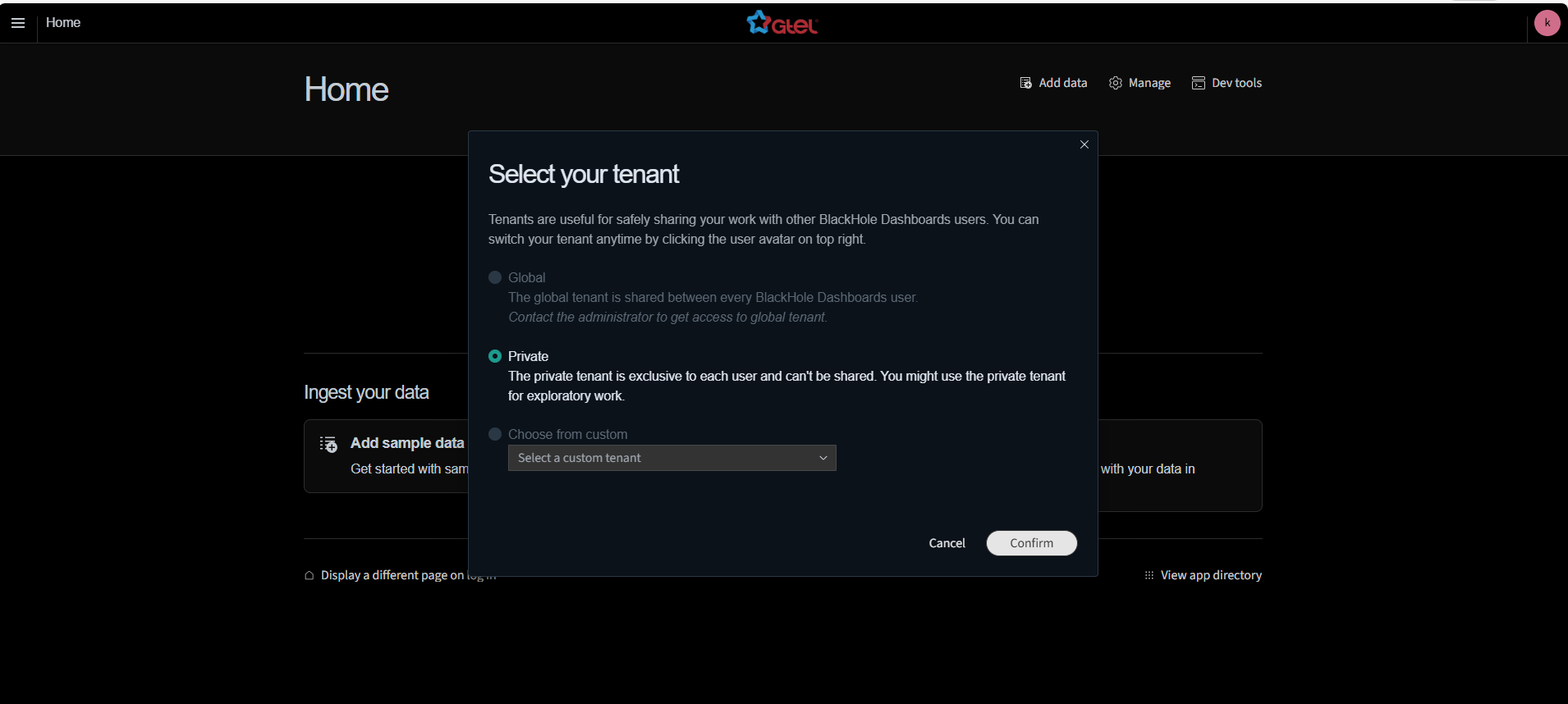
/opt/blackhole-dashboard/blackhole-search- Truy cập vào http://172.16.0.6:5601 với credentials
kibanaserver:kibanaserver##
Bước 3: Cài đặt BlackHole Management
- Cấu hình file docker-compose.yml như sau
services:
  blackhole-devices-management:
    image: ghcr.io/gcsclabs/siem-devices-management:latest
    container_name: blackhole-devices-management
    ports:
      - "3000:3000"
    environment:
      - BLACKHOLE_NODE=https://172.16.0.2:9200 # IP Coordinator
    networks:
      - bh-net
    restart: unless-stopped
    healthcheck:
      interval: 30s
      timeout: 10s
      retries: 3
      start_period: 40s

networks:
  bh-net:
driver: bridge- Khởi động Device Management
Chạy lệnh sau để khởi động dịch vụ:
sudo docker compose up -d- Kiểm tra trạng thái
Kiểm tra xem container đã khởi động thành công chưa:
sudo docker ps -aHoặc xem logs của container:
sudo docker compose logs -f blackhole-devices-managementBước 4: Upload License
Truy cập vào phần License Management trong BlackHole Search
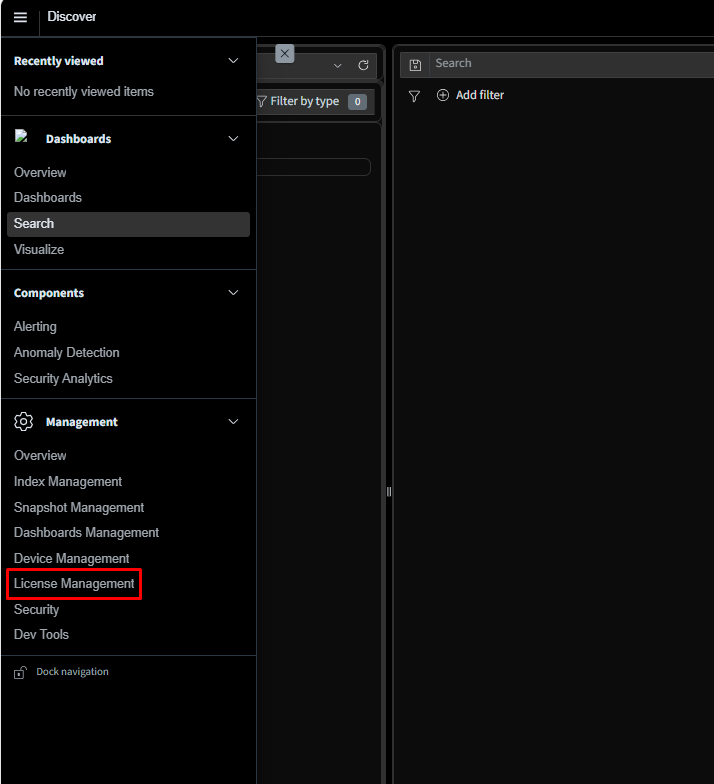
Click vào Add License để thực hiện add
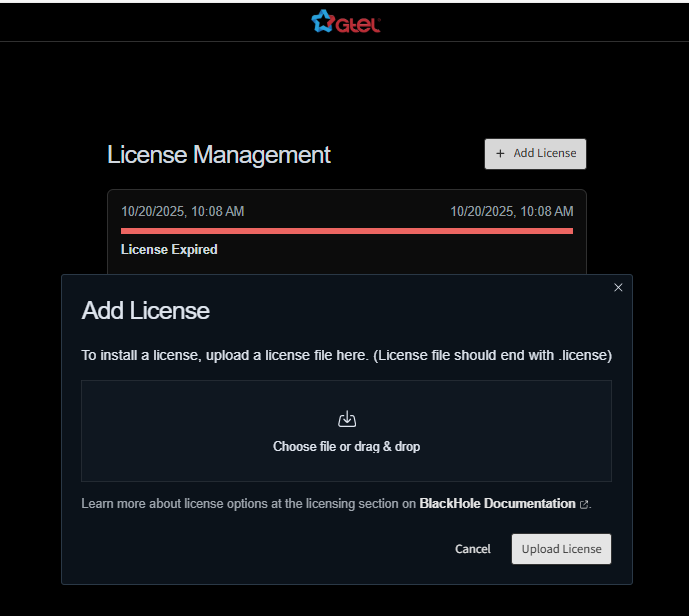
Upload license thành công